

ENTERPRISE TRANSLATION · DOCUMENT AI
Enterprise MT Providers for Document AI Workflows
Choosing an enterprise machine translation provider for document AI requires more than comparing translated sentences. The complete workflow must capture text, preserve meaning, apply terminology, protect sensitive information, and deliver an output that people or downstream systems can use.
That becomes especially important when the source is a scanned PDF, a photograph, a handwritten note or a document containing tables and mixed layouts. A translation engine may perform well on clean text while errors elsewhere in the pipeline change a name, omit a figure or associate a paragraph with the wrong heading.
This guide explains how to assess providers such as Pangeanic, DeepL, Smartling, RWS Language Weaver, SYSTRAN and Tilde against your document requirements. It also shows how Pangeanic Translate’s image translation helps users work with multilingual content that isn't available as editable text.
What matters in enterprise document translation?
- Input handling: Can the workflow process your actual files, including scans, photographs, handwriting and multilingual pages?
- Translation and terminology: Does it preserve meaning and apply approved names, terminology and domain conventions?
- Output requirements: Do you need translated text, an editable document, preserved layout, or structured data for another application?
- Deployment and privacy: Where does each processing stage run, and which parties can access the source and translated content?
- Quality control: How are uncertain results identified, reviewed, and corrected?
- Integration: Can the workflow connect to your repositories, applications, and review processes?
Compare the complete solution, not just the provider name
A shortlist can include Pangeanic, DeepL, Smartling, RWS Language Weaver, SYSTRAN and Tilde. However, a provider’s name alone doesn't show what a proposal includes. Define the product, subscription, model, connectors, and deployment being evaluated before comparing features or costs.
Ask every shortlisted provider to process the same representative documents. Compare the delivered results, the work needed to correct them and the operating conditions under which they were produced. A feature listed as available may still require a separate service, integration or commercial agreement.
| Evaluation area | What to test | Evidence to request |
|---|---|---|
| Images and scanned documents | Printed text, handwriting, skewed pages, low contrast and mixed-language content. | Outputs from your own samples, supported input formats and the treatment of unreadable text. |
| Document reconstruction | Tables, headings, footnotes, columns and reading order. | Downloadable output files and a list of formatting limitations. |
| Terminology and adaptation | Names, specialist vocabulary, repeated phrases and approved style. | Results with your glossaries, translation memories and reference material. |
| Privacy and deployment | Data flows through extraction, translation, quality evaluation and review. | Component-level architecture, retention terms, subprocessors and external dependencies. |
| Quality and human review | Critical errors, uncertainty handling and escalation decisions. | Language-specific evaluation results, review rules and correction logs. |
| Operating cost | Processing, integration, retries, infrastructure and human correction. | Total cost per accepted document under representative production conditions. |
Pangeanic Translate: working directly from images
An important capability to include in this evaluation is translation from an uploaded image. Users do not always have an editable source file. They may have a photograph of a note, a scanned record or a screenshot containing text in another language.
Pangeanic Translate provides an Image mode that accepts visual input and displays translated text alongside it. The examples below show this workflow applied to handwritten Spanish content, with French and English selected as target languages.
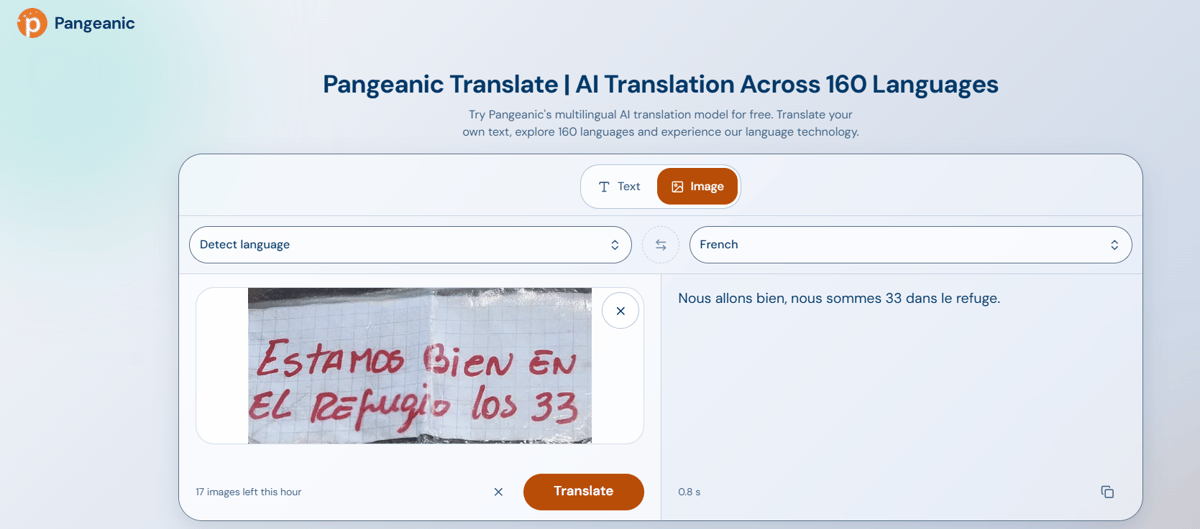
Example 1: a short handwritten message translated into French
The first example contains the handwritten Spanish message “Estamos bien en el refugio los 33”. Pangeanic Translate displays the French output: “Nous allons bien, nous sommes 33 dans le refuge.”
This illustrates the practical value of translating from a photograph: the user can obtain a target-language rendering without first manually typing the source message.
Example 2: a longer handwritten note translated into English
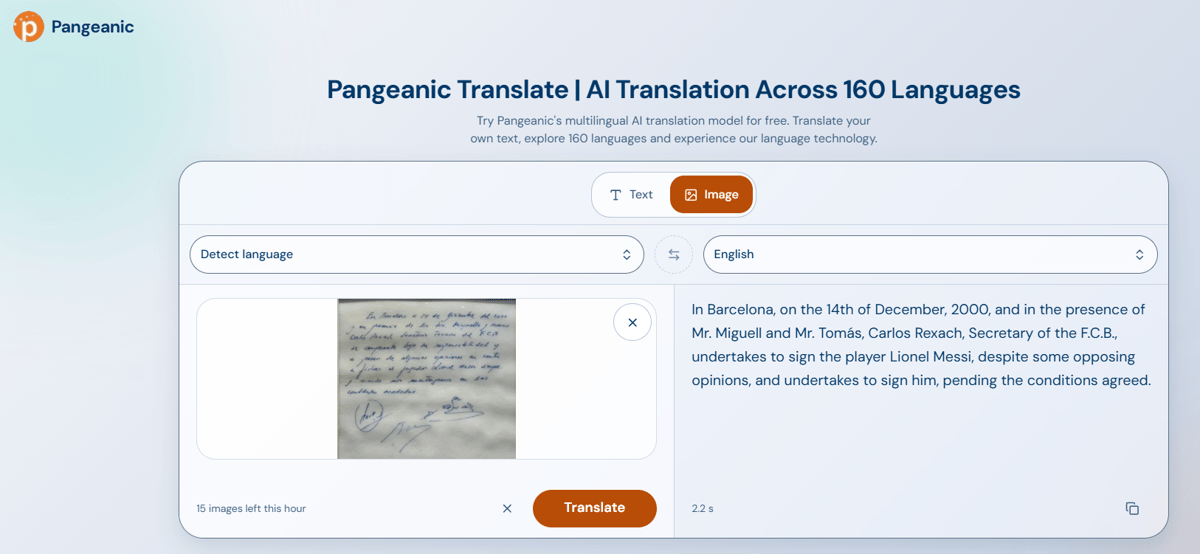
The second example uses an image of the handwritten napkin note associated with Lionel Messi’s signing by Barcelona. Pangeanic Translate displays an English rendering beside the image, illustrating how users can access the meaning of a longer handwritten source.
Longer handwriting introduces additional review needs. Names, dates, titles, abbreviations, and commitments should be checked against the source before the translation is relied on for legal, historical, or commercial purposes.
From image translation to enterprise document workflows
Image translation is a useful entry point, but a production document workflow may require additional stages: document intake, text extraction, terminology handling, translation, quality assessment, human review and export.
Pangeanic’s enterprise AI document translator addresses document-oriented translation requirements, while the ECO Intelligence Platform connects language technologies within broader enterprise workflows.
For scanned documents, confirm the OCR or visual extraction component included in the proposed solution. Document quality, handwriting, page structure, and language affect extraction results. Layout preservation should be tested on representative files rather than assumed from a successful plain-text translation.
Terminology and adaptation should match your content
A fluent translation can still use the wrong product name, legal term or institutional wording. Enterprise evaluation should therefore include approved terminology and examples of the organization’s preferred style.
Pangeanic’s Deep Adaptive AI Translation is relevant when translation must reflect client terminology and reference material. Confirm how the proposed configuration uses glossaries, translation memories and domain resources, and distinguish adaptation at translation time from changes to a model’s underlying parameters.
Measure whether these resources improve the output on previously unseen documents. Test ambiguous terms, abbreviations, names and terminology embedded in images as well as ordinary paragraphs.
Quality gates should address extraction and translation errors
Document AI has more than one potential failure point. A system may translate the extracted text correctly even when that text contains an incorrectly recognized number or name. Evaluation must therefore examine the original document as well as the translated output.
Machine Translation Quality Estimation can help assess translated segments and prioritize review. Within a configured workflow, quality signals can support decisions about which content proceeds and which content requires correction or expert attention.
Automated scores should be evaluated against your languages, document types and error costs. A high score is not a guarantee that a document is suitable for legal, clinical or regulatory use. Critical fields may require explicit checks regardless of the overall score.
Privacy must cover every processing stage
Ask where the source image, extracted text, translated content and review records are processed and stored. Include OCR, translation models, quality services, logs and human review tools in the data-flow assessment.
Pangeanic’s data masking and anonymization capabilities can support workflows that identify and transform sensitive information. The sequence matters: if text must first be extracted from an image, confirm where extraction takes place before any masking is applied.
Private-cloud, on-premises and air-gapped requirements must be confirmed component by component. Do not assume that a capability demonstrated in an online application is included in every disconnected deployment.
How to run a useful provider pilot
- Build a representative sample. Include editable files, scans, image-based content, tables and difficult examples from your real workflow.
- Specify the required output. Decide whether each task needs readable translated text, an editable document, preserved layout, or structured fields.
- Use consistent resources. Give each provider the same terminology, reference documents, and acceptance criteria where supported.
- Review critical errors. Check omissions, negation, numbers, names, dates, terminology and reading order.
- Measure correction effort. Record how much human work is required to produce an acceptable result.
- Confirm production conditions. Validate deployment, privacy, throughput, integration, and operating costs for the configuration you intend to buy.
When Pangeanic is a strong fit
Pangeanic is a European AI Data Operations company specializing in multilingual and multimodal AI. Its translation capabilities are relevant to teams evaluating how document processing, domain adaptation, privacy controls, and quality assessment can work together.
Pangeanic Translate’s image mode provides a concrete way to explore translation from visual sources, including the handwritten examples shown here. Enterprise evaluation can then extend to document handling, workflow integration, review rules and the deployment conditions required by the organization.
The strongest reason to select a provider is evidence that its proposed solution handles your documents accurately, fits your operating environment and reduces the effort needed to deliver accepted results.
Frequently asked questions
Can Pangeanic Translate translate text from an image?
Yes. Its Image mode accepts an uploaded image and displays translated text. The examples in this article show handwritten Spanish content translated into French and English. Try Pangeanic Translate with your own image.
Does image translation preserve the original image layout?
The examples here display translated text alongside the source image. Replacing text within an image and reconstructing an editable document are separate requirements. Confirm these capabilities for your selected enterprise document translation workflow.
Can handwritten content be translated reliably?
Handwriting can be processed, as these examples illustrate, but results depend on legibility, image quality, language and context. Review names, dates, numbers and ambiguous passages before relying on the output.
How should organizations compare language coverage?
Check the specific source and target languages each required feature supports. Text translation, image extraction, document translation, terminology tools and quality estimation may have different language coverage.
What should an air-gapped translation proposal include?
It should identify every component required to operate without external connections, including extraction, translation, terminology resources, quality assessment, licensing, and maintenance. Confirm which capabilities are available inside the proposed disconnected environment.